
Product Demo · 2026
VoiceCal
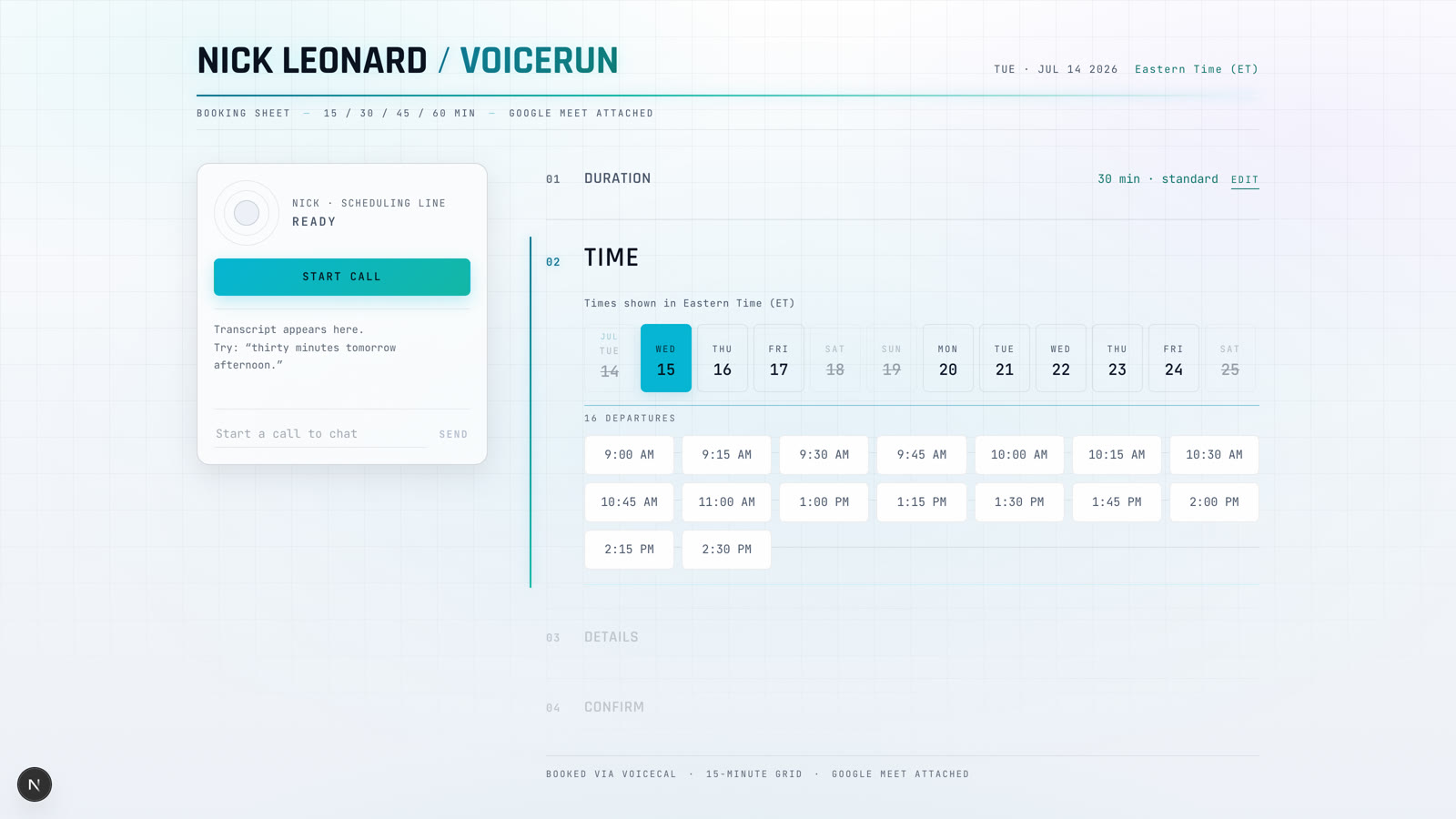
How VoiceRun booked its own calendars. Every team member gets a booking page where visitors talk to them — a first-person voice agent booking real meetings on their Google Calendar, beside a live canvas that shows every open time.
NICK LEONARD / VOICERUN
BOOKING SHEET
The product
A booking sheet you can talk to
The page reads like a paper booking sheet: duration, time, details, confirm. The voice dock connects you to the page’s owner speaking in the first person — “let me grab that time” — while every open slot stays clickable. Confirmed meetings land on the owner’s calendar with a Google Meet link and an emailed invite.
- 1
- agent serves every calendar
- 2
- events to book a meeting
- 3
- ways to book — talk, type, tap
- 15
- minute slot grid, TS + Python identical
The architecture
The browser is the bridge
Three components, one written contract — CONTRACT.md is the source of truth, and if a component disagrees with it, the component is wrong. The rule that shapes everything: the agent never talks to Google.
Step 1 of 5
The canvas loads availability
Before the call, the browser asks the Next.js bridge for free time. The bridge reads the owner's Google Calendar freebusy, and the canvas renders every open slot.
The event contract
Two events book the meeting
When the caller confirms, the agent emits a single book_request event and the browser executes it against the bridge. The result comes back as a machine-readable [system] message the agent speaks a confirmation from — never words the caller “said”.
Idempotency keys make replays safe, the bridge re-checks freebusy for the exact window before inserting (last-write-wins race guard), and a full booking_state snapshot after every turn is what paints the canvas — the UI is a projection of the agent’s session state.
# agent ➜ browser (DebugEvent)
"book_request": {
  "request_id": "req_ab12cd",
  "start": "2026-07-15T18:30:00Z",
  "duration_min": 30,
  "email": "jane@acme.com",
  "purpose": "VoiceRun pricing for Acme"
}

# browser ➜ agent (sendTextEvent)
"[system] booking_result": {
  "request_id": "req_ab12cd",
  "ok": true,
  "meet_link": "meet.google.com/…"
}
Scaling to the team
One agent, every calendar
One deployed agent serves every team member’s page. The page passes the owner’s name and voice at session start, so the agent speaks first-person as that person — “Hi, I’m Sarah”, her Cartesia voice, her working hours, her calendar. It is “my calendar” and “let me grab that time”, never an assistant speaking for someone.
Adding a member is one entry in team.ts and a redeploy: slug, name, email, timezone. Hours, voice, and notice windows fall back to team-wide defaults. That publishes Sarah’s booking page, booking on her calendar.
{
  slug: 'sarah',
  name: 'Sarah Chen',
  email: 'sarah@voicerun.com',
  timezone: 'America/Los_Angeles',
  voiceId: '<cartesia-voice-id>',
  blurb: 'Engineering, VoiceRun',
}
Production learnings
Deterministic where it counts
Code owns the flow, the LLM writes the words
The flow is a code-owned step machine — duration, slot, details, confirm, booked — with the LLM writing the words, not deciding the path. A background reducer extracts details from the whole conversation and is launched before the agent speaks, so it never blocks speech. If the caller opens with everything (“30 minutes tomorrow afternoon to talk pricing”), extraction fills ahead and steps auto-skip.
One slot grid, two languages
Slot math is computed identically in TypeScript and Python — every 15 minutes on the UTC grid, clipped to working hours and minimum notice — so the canvas and the agent can never disagree about what’s open.
What will you build?
VoiceCal books the team's real meetings every day. A Solutions Architect can help you scope your own — or pip install voicerun-cli and start tonight.